On device
A transcript that knows who spoke
Microphone and system audio become text on your Mac, with speaker labels you can rename once and reuse.
Context for the tools you use to think, work, schedule, build, plan, and automate.
Cyrano is an audio-driven information relay. It carries the conversation you are in, and the window, screenshot, or passage in front of you, to ChatGPT, Claude, Codex, or another MCP client, so none of it has to be explained again by hand. MCP receives text, never raw audio.
How it works
Three steps, and none of them is copy and paste.
Session
A call, a dictated thought, or whatever is playing through your Mac. Nothing is captured until you start a visible session.
Cyrano
Transcription and speaker labels run locally. Topics, tasks, and open questions build up while people are still talking.
Live AI chat
What did we just commit to?
Beta ships Thursday, and the pricing page is yours by Wednesday. Want me to draft it?
Claude, ChatGPT, Codex, or any other MCP client reads the running session and answers from it. Text only, never the audio.
The Sessions window

The session map: topics thicken as they are returned to, and every task, ask and next move hangs off the topic it came from.A demo call, mapped by the app’s own map builder. Click a green seal for a task and the line that produced it, shift-click on through its topics to draw a stream, and use ← → to step through the call. Click in, then scroll or pinch to zoom. Review lists the same call, and Both puts the two side by side: pick a row and the map finds it.
What Cyrano does
Stop rebuilding context by hand.
Transcribe, extract, map, ask, deliver.
On device
Microphone and system audio become text on your Mac, with speaker labels you can rename once and reuse.
On device
Topics, tasks, and open questions build into a map while people are still talking, so you can see the shape of the call before it ends.
Any MCP client
Your assistant reads the running call and answers from it. Text only, never the audio.
Pro
Hold a key and speak into whatever has focus. Cleanup, your own dictionary, and corrections it learns from.
On device
The front window, a pasted screenshot, or the clipboard. Text is read on your Mac, so no call has to be running.
Pro
Send what came out of a session to your agent, a vault, a calendar, or a webhook, as it finishes or as a daily digest.
Your call
Every session carries a retention choice. Let it expire, hold it a day, or pin the ones worth keeping.
The app
One rendered loop. Five real screenshots.
Live while they talk.
Still there in review.
The relay
Goes in
Comes out
Assistants read over MCP and receive text. Delivery destinations go straight from your Mac, with no server of ours in between.
The concept
Privacy
Local by default. Explicit when shared.
Audio that leaves your Mac
Zero bytes. Transcription and speaker labels run on your Mac.
Nothing is captured until you start.
Connect assistants individually. Revoke them anytime.
Expire now, keep 24 hours, or pin.
See every connection the app can make
Pricing
Every install includes three Pro days. No card.
On device
Free · forever
Pro · on your Mac
Once · one-time unlock
Copilot · hosted
$1.99 /mo, billed annually
Reads to
Claude, ChatGPT, Codex, Cursor, or any MCP client. Your choice.
Connecting an assistant on your Mac is free on every plan and needs no account. Reading a session while it is still happening, and replying into it, is where the paid line sits: without Pro, an assistant reads a session 45 minutes after its last audio. That wait is a commercial line, not a technical one, and everything it applies to stays on your machine either way.
USD. Tax may apply. Cancel anytime. BYO backend supported.
Network traffic
Cyrano touches a lot of your Mac: the mic, the screen, other apps. Touching is not sending. This is the complete map of what crosses the wire, drawn from the code, and the same map the app computes live under Settings, Where your data goes.
Audio and transcript both stay on this Mac. The only traffic is an update check and a license check, and neither carries a word you said. Audio stays on this Mac. Transcript text goes to a backend you run, or straight to your own model account. Cyrano is not in the loop. Audio stays on this Mac. Transcript text transits Cyrano’s server to the model, is never logged, and is deleted when the session ends unless you keep it. Audio stays on this Mac, and so does analysis. With a remote assistant paired, live session text transits Cyrano’s server while the session runs, then is deleted within the hour. Fast transcription is on: your audio, both sides of the call, streams to ElevenLabs under your own key. That is the one way audio ever leaves. Transcript text still follows the plan you picked.
Three routes. The first never leaves the Mac. The other two go through Cyrano’s server, and this is exactly what the server holds on each.
Every connection the Mac app can make, with what it carries and what is kept on the other end. If it is not on this list, the app does not do it.
| Connection | What crosses | When | Kept on the other end |
|---|---|---|---|
| On every plan | |||
| Update check | A request for one public file. No identifiers, no cookies. | Hourly, and on wake. | Nothing about you. |
| Trial or license check | Your license key or a one-way hash of the hardware id, a random device id, this Mac’s name, the app version. No session content. | Hourly on the free trial, weekly with a Pro license. | A license record, so the key works on your Macs and not on someone else’s. |
| Apple speech model | An OS-managed download from Apple. No content. | First run, and on model updates. | Nothing. |
| Bug report | What you typed, an optional reply address, and app and OS versions if you leave that switch on. The report has no field for transcripts or audio. | Only when you press send. | The report, until answered and pruned. |
| Hosted copilot only | |||
| Session socket | Transcript text, one line at a time, plus the watch categories you named and your retention choice. Never audio: the protocol has no audio field. | While a session runs. | Deleted when the session ends. Or 24 hours, or pinned until you delete it. Never written to logs; content logging is switched off in the production build. |
| The model | Windows of transcript text, forwarded from Cyrano’s server on Cyrano’s key. Sessions go to OpenAI; dictation polish and day refinement go to Anthropic. | As the session is analysed. | Not stored by Cyrano. The provider’s own API terms apply. |
| Re-analyse, Ask, Polish, Refine | The text you point at: a finished transcript, a question with its context, a dictation, or one section of your day document. | Only when you ask. | Nothing. These routes pass through and store nothing. |
| Billing | Checkout happens on Stripe, in your browser. Cyrano holds a subscriber id, the subscription status, and a spend meter. No card, no transcript. | On subscribe, on renewal. | The subscription record. |
| Your own key or backend only | |||
| Your Worker, or your model account | Transcript text, to a backend you run, or straight to Anthropic or OpenRouter under your key. | While a session runs. | Whatever your deployment and your provider keep. Cyrano is not in the loop and cannot read, disclose, or delete it. |
| Opt-ins, off by default | |||
| Assistant on this Mac | Session text over 127.0.0.1, port 42617, with a bearer token in a file only your user can read. The listener binds loopback only; nothing off this Mac can reach it. | When you connect an app. | Nothing leaves the Mac. |
| Remote assistant | Live session text through Cyrano’s server while the session runs; an index of session titles, times, and tags; past sessions pulled from this Mac on demand and relayed without storage. | When you pair claude.ai or ChatGPT. | The live copy, at most one hour after session end, even when pinned. The title index, 30 days. Transcripts of past sessions, nowhere. |
| Device sync | Session ciphertext through your own iCloud. Keys exist only on your paired devices. Record ids are blinded so even the id is not readable. | When you pair a device. | Ciphertext in your iCloud account. Cyrano’s servers are not involved. |
| Fast transcription | Raw 16 kHz audio of the whole session, both sides, streamed to ElevenLabs under your own key. The single way audio ever leaves. | While a session runs, if enabled. | Per your ElevenLabs account terms. |
| Fast voice | The text of a whisper cue, to ElevenLabs under your own key, for speech synthesis. | Per whisper, if enabled. | Per your ElevenLabs account terms. |
| Context sharing | Your clipboard, or a single window read on this Mac and turned into text. The app name and window title travel with it. The image itself leaves only if you send it to your agent. | At the moment you press attach. | With the session, per its retention. Discarded after use unless you keep it. |
| Deliveries | The session export, to a webhook, Google Drive, Google Calendar, or Arepo destination you created. | When a session ends, per your rules. | At the destination you chose. |
| Never | |||
| Analytics, crash, or ad SDK | None in the app. No taps, no screens, no advertising identifier. | ||
| Contacts, Location | Not requested. Not used. | ||
| Screen, clipboard | Read only when you press attach, or for naming a call from its window title if you switch that on. Nothing from either leaves without a deliberate action. | ||
| Voiceprints | Speaker grouping uses an in-memory signature that is discarded at session end. Nothing acoustic is saved or uploaded. | ||
| An inbound port | No listener reachable from the internet. Remote reads arrive over a connection your Mac opened, and the Mac decides whether to answer. | ||
Prelaunch
Downloads are paused while we complete legal review. We will email you when access opens.
The promo
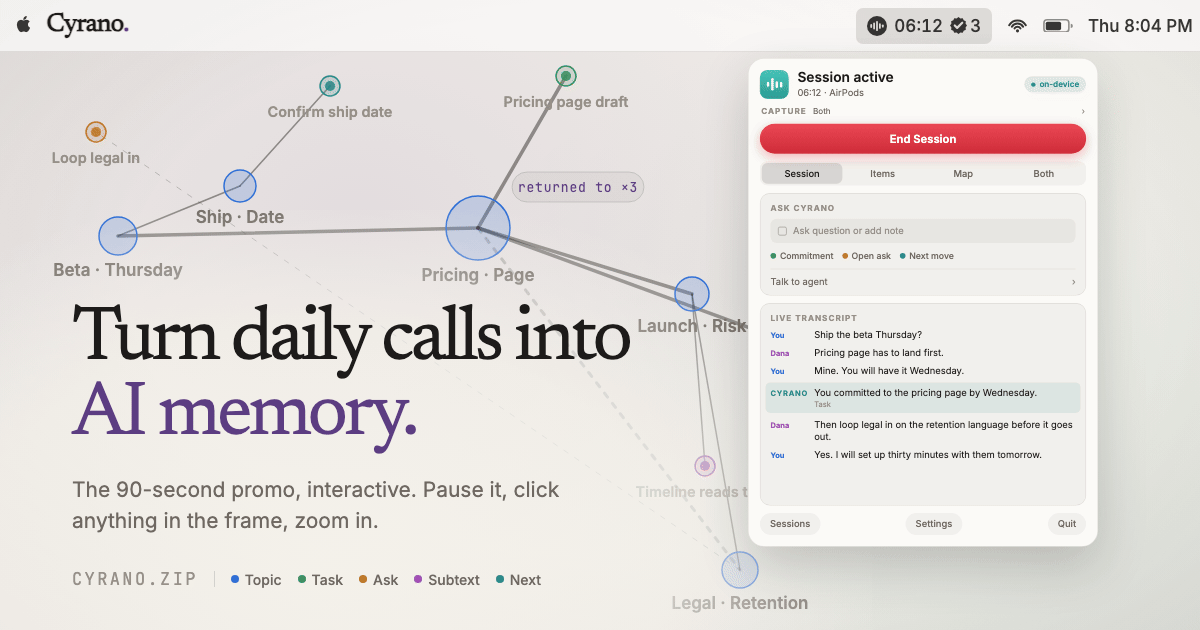
The 90-second promo, interactive — pause it, click anything in the frame, zoom in. Watch it here.